
Setting Up Azure Custom Domains: Multiple App Services on One Domain
Setting up custom domains for Azure App Services can be tricky, especially when you need to route different subdomains to different Azure applications. Here’s what I learned when configuring multiple Azure App Services under a single client domain.
The Scenario
I had a client with a main domain: somedomain.com
And needed to set up two different Azure App Services:
- Portal1 App:
portal1.azurewebsites.net– Needs to handle multiple dynamic user subdomains - Portal2 App:
portal2.azurewebsites.net– Needs to handle specific static subdomains and admin wildcards
The goal was to route different subdomains to different Azure applications based on the business requirements.
The DNS Records You Need
For this multi-app setup, you’ll need both CNAME and TXT records:
DNS Configuration
;; CNAME Records
*.somedomain.com.                    1    IN    CNAME    portal1.azurewebsites.net.
get.somedomain.com.                  1    IN    CNAME    portal2.azurewebsites.net.
*.admin.somedomain.com.              1    IN    CNAME    portal2.azurewebsites.net.

;; TXT Records
;; Portal1 verifications
asuid.user1.somedomain.com.          1    IN    TXT      "SOMEUUID"
asuid.user2.somedomain.com.          1    IN    TXT      "SOMEUUID"

;; Portal2 verifications
asuid.get.somedomain.com.            1    IN    TXT      "SOMEUUID"
asuid.user1.admin.somedomain.com.    1    IN    TXT      "SOMEUUID"
asuid.user2.admin.somedomain.com.    1    IN    TXT      "SOMEUUID"
How This Works:
Portal1 (Dynamic User Subdomains):
*.somedomain.com→portal1.azurewebsites.net- Handles:
user1.somedomain.com,user2.somedomain.com,company1.somedomain.com, etc.
Portal2 (Static + Subdomain Wildcards):
get.somedomain.com→portal2.azurewebsites.net*.admin.somedomain.com→portal2.azurewebsites.net- Handles:
get.somedomain.com,user1.admin.somedomain.com,user2.admin.somedomain.com, etc.
Important Note About Wildcards
CNAME Records: You can use wildcards (e.g., *.somedomain.com) to route multiple subdomains to the same Azure app.
TXT Records: You cannot use wildcards for asuid verification records. Each subdomain requires its own individual TXT record. Azure’s verification process looks for exact matches, so you must add each asuid.subdomain.domain.com record separately. (I tried multiple registrars and non of the allowed TXT records with wildcard)
See below from Cloudflair:
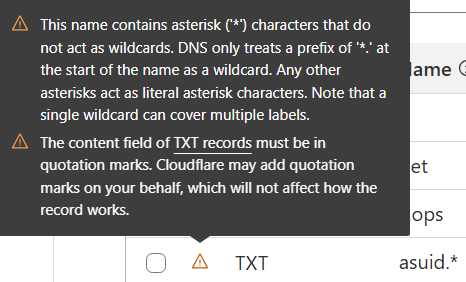
also this in Tasjeel.ae:

Common Issues I Encountered
1. ASUID Tokens Are Reused
Don’t panic if Azure gives you the same ASUID token for different domains. This is normal! Azure often reuses tokens within the same subscription or App Service.
2. DNS Propagation Takes Time
Even with low TTL values, DNS changes can take:
- 15-30 minutes minimum
- Up to 48 hours in some cases
- Use tools like dnschecker.org to verify
The Step-by-Step Process
- Get ASUID tokens from each Azure App Service’s custom domains section
- Get tokens from Portal1 for user subdomains
- Get tokens from Portal2 for get/admin subdomains
- Add TXT records first (recommended for smoother validation)
- Wait for TXT propagation (15-30 minutes)
- Add CNAME records to your DNS provider
- Verify both records with DNS checker tools
- Configure custom domains in each Azure App Service (Azure validates TXT records here)
- Set up SSL certificates (optional but recommended)
Note: While the order doesn’t affect functionality, adding TXT records first can streamline the validation process and potentially avoid downtime during domain verification.
Start with low TTL values (300-3600 seconds) during setup for faster changes
Verification Tools
Use these free tools to check your DNS setup:
- dnschecker.org – Global DNS propagation
- whatsmydns.net – Multiple location checks
- mxtoolbox.com – Comprehensive DNS tools
Final Thoughts
Setting up multiple Azure App Services under a single domain requires careful planning of your subdomain structure and DNS routing. The key is understanding how to use wildcards effectively while ensuring each subdomain that needs verification gets its own ASUID TXT record.
Take your time with DNS propagation, double-check your record formats, and plan your subdomain routing strategy before you start. The combination of CNAME records for traffic routing and TXT records for ownership verification will give you a flexible, scalable setup for multiple applications under one domain.
Important: When you delete the Azure App Service, make sure also to delete the records in your DNS registrar so you avoid any Subdomain takeover and dangling DNS problems check here
