
How Azure Event Grid Actually Works (A Hands-On Guide)
I recently spent some time understanding Azure Event Grid by building a small proof of concept.
The Problem It Solves
Imagine you have an API that creates orders. When an order is created, you need to send a confirmation email, update inventory, notify the warehouse, and log it for analytics. The naive approach is to call all these services directly from your API:
public async Task CreateOrder(Order order)
{
    await _db.SaveOrder(order);
    await _emailService.SendConfirmation(order);
    await _inventoryService.Update(order);
    await _warehouseService.Notify(order);
    await _analyticsService.Log(order);
}
This works until it doesn’t. What happens when the email service is down? Does the order fail? What if you need to add a new service next month? You’re back to modifying this code.
Event Grid flips the model. Your API just announces “an order was created” and walks away. Anyone interested can subscribe and react independently.
The Core Concepts
There are four pieces to understand:
Events are announcements. Something happened. “Order created.” “Order shipped.” “Task completed.” Each event has a type, a subject, and some data.
Topics are channels where events get published. Think of it as a mailbox. Publishers drop events in, Event Grid figures out where to send them.
Subscriptions connect topics to handlers. They say “when an event of type X arrives, send it to Y.” You can filter by event type, so different handlers get different events.
Handlers are the endpoints that receive and process events. Azure Functions, webhooks, Service Bus queues — anything that can receive an HTTP POST.
The key insight: publishers don’t know who’s listening. Subscribers don’t know who’s publishing. Event Grid sits in the middle and routes everything.
Building It
I built a simple POC with two components.
First, an API called OrderService that publishes events:
app.MapPost("/orders", async (CreateOrderRequest request, EventGridPublisherClient client) =>
{
    var orderId = Guid.NewGuid();

    var @event = new EventGridEvent(
        subject: $"/orders/{orderId}",
        eventType: "OrderCreated",
        dataVersion: "1.0",
        data: new { OrderId = orderId, request.CustomerName, request.Amount }
    );

    await client.SendEventAsync(@event);

    return Results.Created($"/orders/{orderId}", new { Id = orderId });
});
Second, an Azure Function that subscribes:
[Function(nameof(OrderCreatedHandler))]
public void Run([EventGridTrigger] EventGridEvent eventGridEvent)
{
    _logger.LogInformation("Order created: {Subject}", eventGridEvent.Subject);
    _logger.LogInformation("Data: {Data}", eventGridEvent.Data);
    // Send email, update database, whatever
}
The publisher needs the Event Grid endpoint and access key to push events. The subscriber needs nothing — Event Grid pushes to it.
Wiring It Up
The subscription is where you connect things. You can do it via CLI or the Azure Portal:
az eventgrid event-subscription create \
  --name order-created-sub \
  --source-resource-id /subscriptions/.../topics/order-events-topic \
  --endpoint-type azurefunction \
  --endpoint /subscriptions/.../functions/OrderCreatedHandler \
  --included-event-types OrderCreated
That --included-event-types is the filter. This subscription only receives OrderCreated events. If you want a catch-all that receives everything, omit the filter.
Push, Not Pull
This tripped me up initially. The functions don’t poll Event Grid. They don’t fetch events. Event Grid pushes to them via HTTP POST.
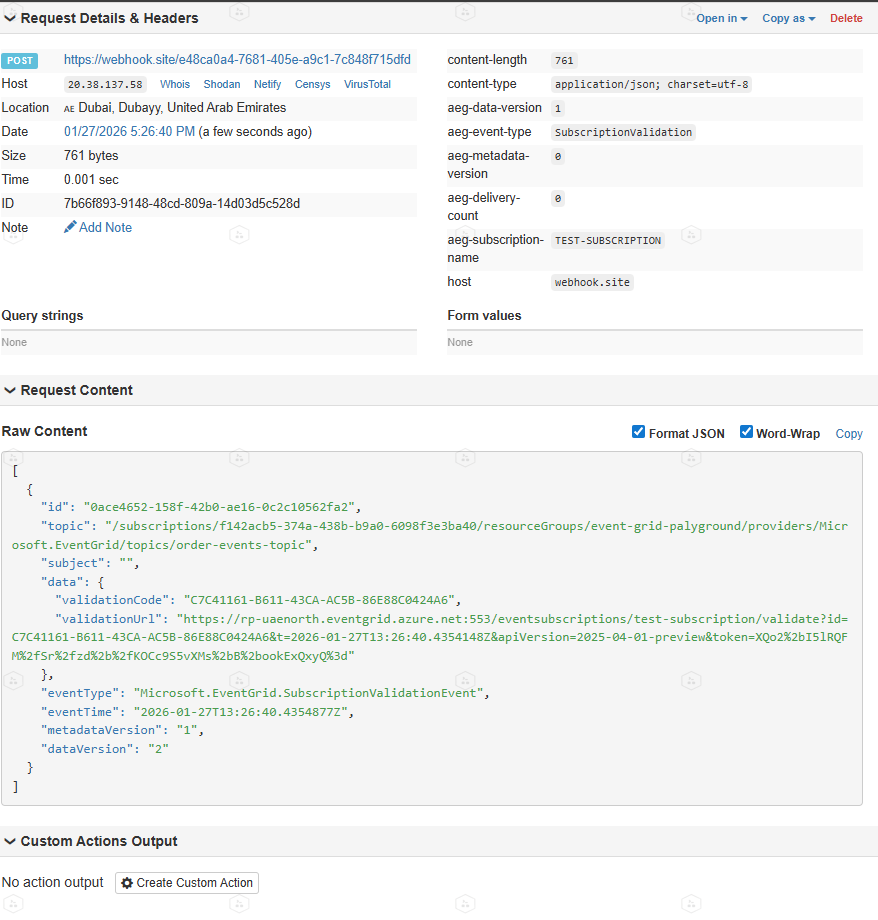
When you create a subscription pointing to a webhook, Event Grid first sends a validation request to confirm you own that endpoint. Azure Functions handle this automatically, but if you’re using a custom webhook, you’ll need to respond to the handshake.
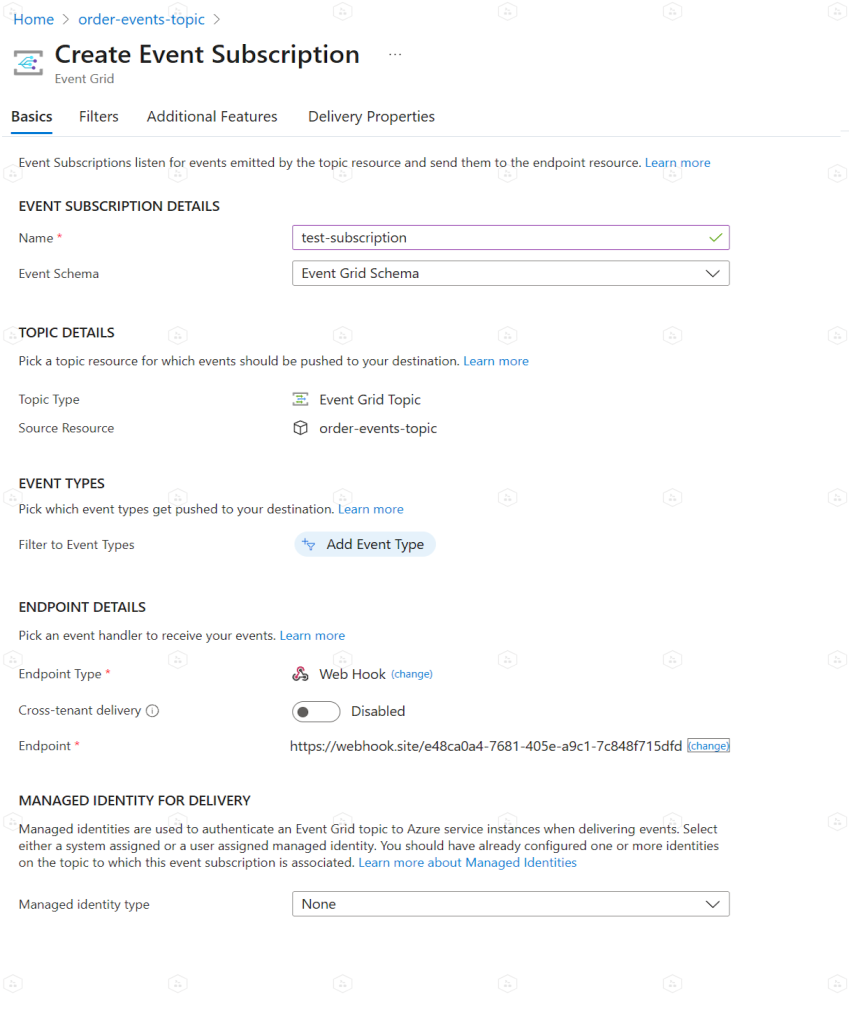
you can use https://webhook.site/ to get a testing unique then add a test-subscriber to see the reflection of the webhook
Here i created a test-subscriber in the porta:
the you need to verify the link for the testing webhook (handshake) so Azure knows that you own the webhook by curling the url in “ValidationUrl” propery
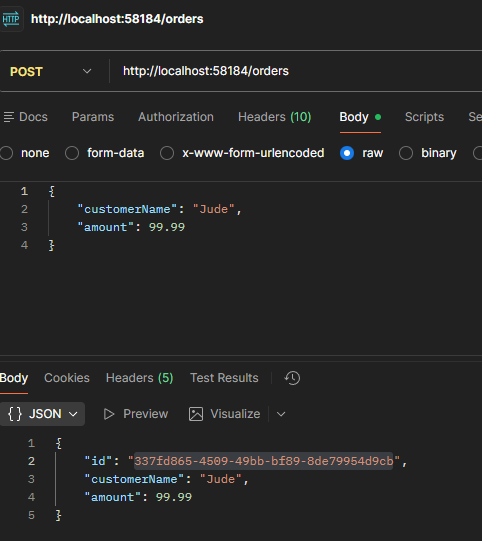
now lets trigger our OrderCreate Event:
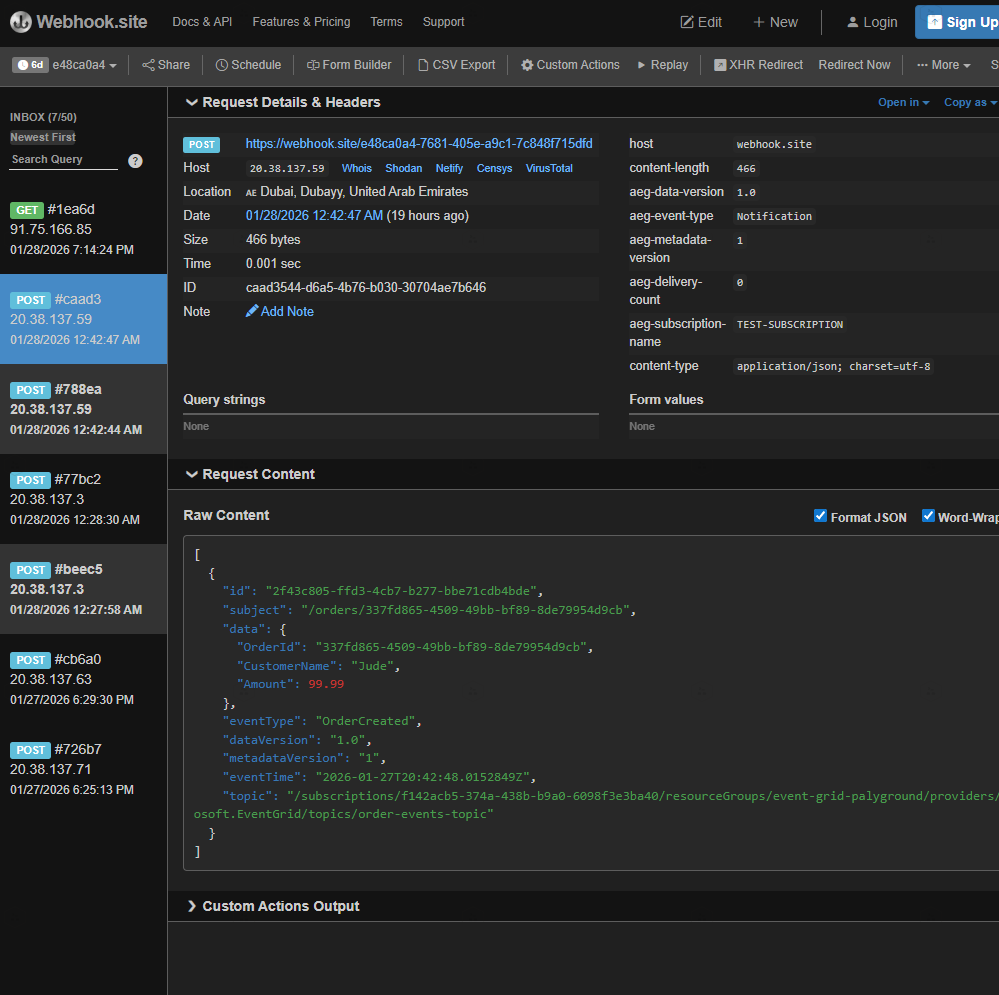
and go to check your webhook reacting to this event (notice the orderId)
Now, we gonna replace our testing webhook with our Azure Cloud Functions.
I am going to skip the part on how to create Azure cloud functions to save some time. but here is our created Function app with two functions that represent our two events (create order and ship order):

Then we create two subscriptions in our Event Grid for those two functions, make sure to link the function endpoint as the webhook:
you can use the portal (easier) or CLI (sexier)
Create subscription for OrderCreatedHandler:az eventgrid event-subscription create \ --name order-created-sub \ --source-resource-id /subscriptions/<your-sub-id>/resourceGroups/<your-rg-name>/providers/Microsoft.EventGrid/topics/<your-topic-name> \ --endpoint-type azurefunction \ --endpoint /subscriptions/<your-sub-id>/resourceGroups/<your-rg-name>/providers/Microsoft.Web/sites/<your-function-app-name>/functions/OrderCreatedHandler \ --included-event-types OrderCreated
Create subscription for OrderShippedHandler:
az eventgrid event-subscription create \
  --name order-shipped-sub \
  --source-resource-id /subscriptions/<your-sub-id>/resourceGroups/<your-rg-name>/providers/Microsoft.EventGrid/topics/order-events-topic \
  --endpoint-type azurefunction \
  --endpoint /subscriptions/<your-sub-id>/resourceGroups/<your-rg-name>/providers/Microsoft.Web/sites/<your-function-app-name>/functions/OrderShippedHandler \
  --included-event-types OrderShipped
and now do the same and invoke any event, and check the reflections in the functions logs using CLI:
func azure functionapp logstream order-notifications-fn
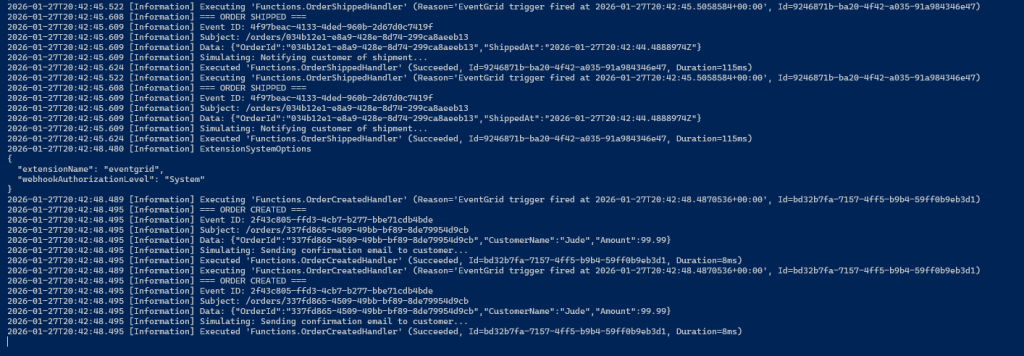
or from the portal:

When to Use It
Event Grid makes sense when you want loose coupling. Your order service shouldn’t care about the email service. It just announces what happened and moves on.
It’s not for high-throughput streaming (that’s Event Hubs) or complex message queuing with sessions and transactions (that’s Service Bus). It’s for reactive, event-driven architectures where you care about discrete state changes.
What I Learned
Building this small POC made the concepts stick. Reading documentation gives you the theory. Actually wiring up a topic, creating subscriptions with filters, and watching events flow through the system makes it real.
If you’re learning Event Grid, build something small. An API that publishes two event types. Two functions that subscribe to different events. Watch the logs. Break things. That’s where the understanding comes from.
check the full code at github repo
